Subscription plans
This page applies only to apps that already use the legacy Overwolf Subscriptions solution with Xsolla. Overwolf no longer approves Xsolla for new subscription integrations. Tebex is the only approved subscription provider.
To add subscriptions to your app, see Subscriptions by Tebex.
This section of the console gives you a detailed overview of your app's subscription plans, allowing you to filter them by plan name.
Every subscription plan contains:
- The subscription's
Plan title. - The subscription plan's
Price (USD). - The subscription plan's
Period(month). - The subscription plan's
Status. - A button for editing the subscription plan
The active subscriptions are split into pages, using The Paging Footer.
Editing a subscription plan
By clicking the edit button on a plan, you can edit the different parts of that plan, by utilizing The Footer Toolbar.
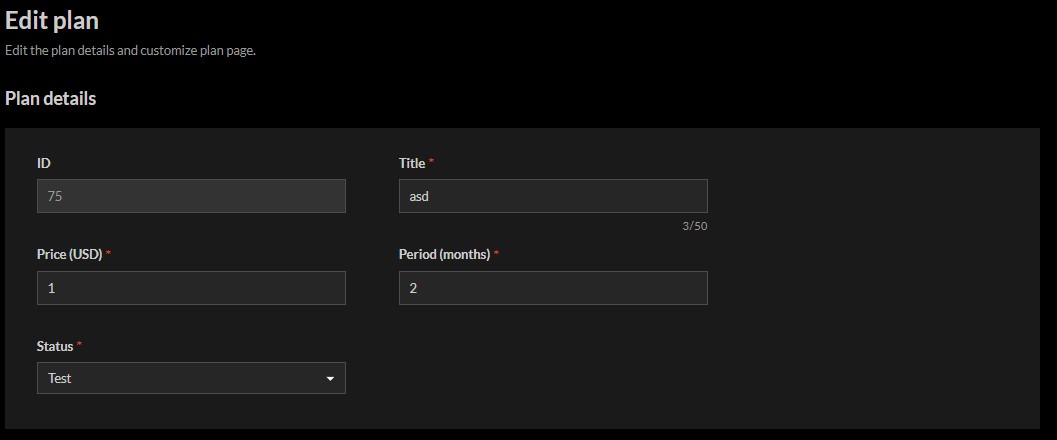
When you migrate your subscription plan from the previous solution based on Xsolla, make sure you change the status of your subscription plan from Active to test to hide the subscriptions options in the app store.
Plan details
You can edit the subscription's basic details here. This includes:
- The subscription plan's
Title. - The subscription plan's
Price (USD). - The subscription plan's
Period (months. - The subscription plan's
Status.
You can also view the subscription's ID, which is used when interacting with the overwolf.profile.subscriptions API.
Customizing
Customize plan page
Subscriptions have a "landing page", that the user sees before being redirected to the exact payment page.
This page can be customized, in order to help the users understand why they might want this subscription.
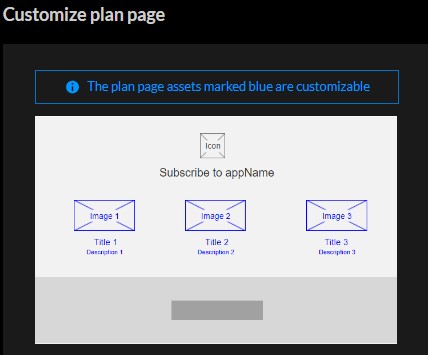
The aforementioned page's Icon will be the app's Icon.
Apart from that, there will be 3 "tiles", that contain an image, a title, and a short description. These can be edited directly below the previous section. For example, here is the first section's editable area:
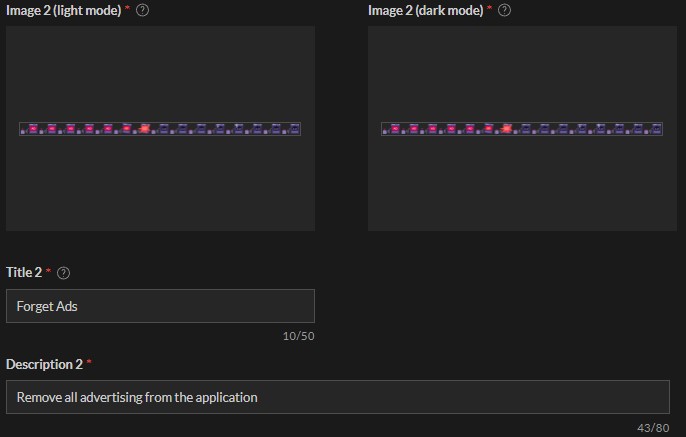 Each section's title and description can be edited, as long as they contain less than 50 and 80 characters respectively.
Each image can also be changed:
- It can be set to be a static image, in which case, the resolution should be exactly 150X96 pixels.
- It can be set to a "sprite-sheet", in which case, the image's resolution should be exactly 2250X96 pixels,
with each "frame" that will be cycled through being exactly 150X96 pixels (without any padding). For example:
