High Impact Ads
Demand for High impact ads is different from the programmatic demand behind standard ad units: it depends on Brand Partnerships direct-deal availability, with targeting that varies deal by deal. Once the unit is live in your app, this inventory will be included in any relevant deals. Reach out to your DevRel to find out if you qualify.
High impact ads are bold, attention-grabbing ads designed for maximum visibility. They specifically focus on delivering immersive, interactive content to your users. High impact ads occupy an entire ad zone (parent container) (<div>) of the app UI and temporarily hide surrounding content to maximize ad impact. Once the high impact ad has completed, your standard ads will be displayed again.
Key features
- High visibility—designed to occupy the entire ad zone (parent container) (
<div>) of your app's layout. - Responsive size—adapts to your ad zone (parent container) dynamically.
- Ad event lifecycle—integrate with event listeners to manage UI transitions.
Ad zone (parent container)
Your app will need to have an ad zone (parent container) (<div>). This is an area of your app that is designated for ads. You can add one or more individual ad containers of smaller sizes to the ad zone.
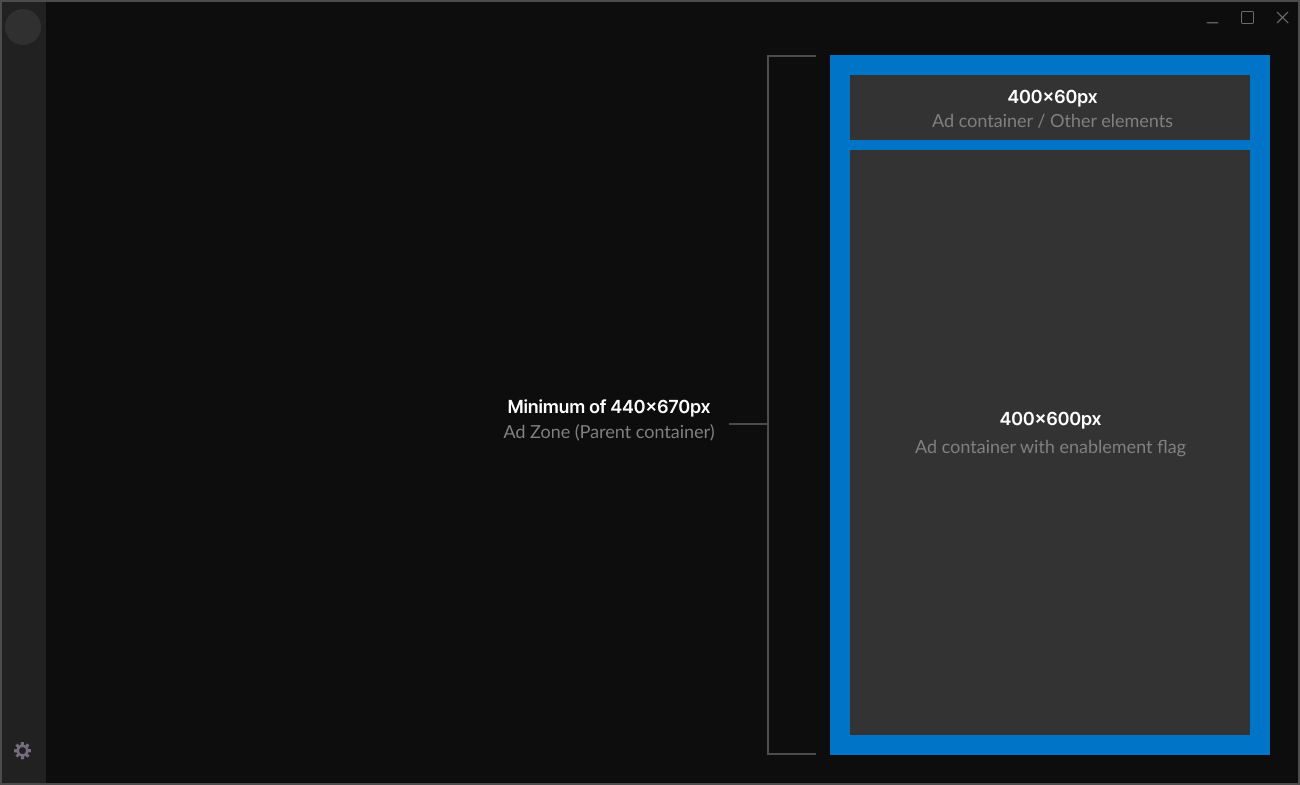
The ad zone (parent container) needs to take up the entire height of your app window and stretch dynamically if the app window size changes.
Ad zone Requirements
-
Minimum ad zone (parent container) (
<div>) of 440x670px. In the ad zone (parent container) you can add one or more individual ad containers of smaller sizes.- Width—fixed at 440px.
- Height:
- Responsive to the app window height.
- Minimum height: 670px.
-
The ad zone (parent container) should stretch vertically with the app window.
important- If the ad zone (parent container) (
<div>) is smaller than 440x670 px, the high impact ad will not render correctly.
- If the ad zone (parent container) (
- If you have multiple ad containers in your ad zone (parent container), or other HTML elements, you must remove them. Use event listeners to restore your standard ads and their respective sizes.
Enabling high impact ads
To enable High impact ads:
- In your ad zone (parent container), add the
enableHighImpact: trueflag to only one ad container.
Example of two ad containers in an ad zone
  // High-impact ads container
  const owAdLarge = new OwAd(document.getElementById("ad-div-large"), {
    size: { width: 400, height: 600 },
    enableHighImpact: true,
  });

  //
  const owAdSmall = new OwAd(document.getElementById("ad-div-small"), {
    size: { width: 400, height: 60 },
  });
- Set an event listener to dynamically remove the non-selected ad containers when the
high-impact-ad-loadedevent is received. Change the height and width to 100% so it dynamically fits the ad zone (parent container).
function HighImpactActiveLayout() {
  return (
    <div id="ads-parent">
      <div id="ads-container-large" style={{ width: "100%", height: "100%" }}>
        <div id="ad-div-large" />
      </div>

      {/* the small ads-container must be hidden or removed */}
    </div>
  );
}
- Set an event listener for the
high-impact-ad-removedevent and restore the previously removed ad containers (and any other HTML elements) within the ad zone (parent container). Make sure to restore all the ad containers and their original sizes.
function RestoredLayout() {
  return (
    <div id="ads-parent">
      <div id="ads-container-large" style={{ width: 400, height: 600 }}>
        <div id="ad-div-large" />
      </div>

      <div id="ads-container-small" style={{ width: 400, height: 60 }}>
        <div id="ad-div-small" />
      </div>
    </div>
  );
}
If no High-Impact creative is available, the high-impact-ad-loaded event will never fire, and the app must remain in the default layout without applying any layout changes.
Events table
| Event name | Description |
|---|---|
high-impact-ad-loaded | Triggered when a High Impact creative is loaded. |
high-impact-ad-removed | Triggered when the High Impact creative is removed. |
How to test High Impact ads
To test high impact ads:
- Open your app, then open the developer console (Ctrl + Shift + I).
- Press the Console tab, then paste
localStorage.owAdTestAd = trueinto the console, and press Enter. - Press F5 to refresh the app window.
- Ads should appear in your app in the locations you designated.